
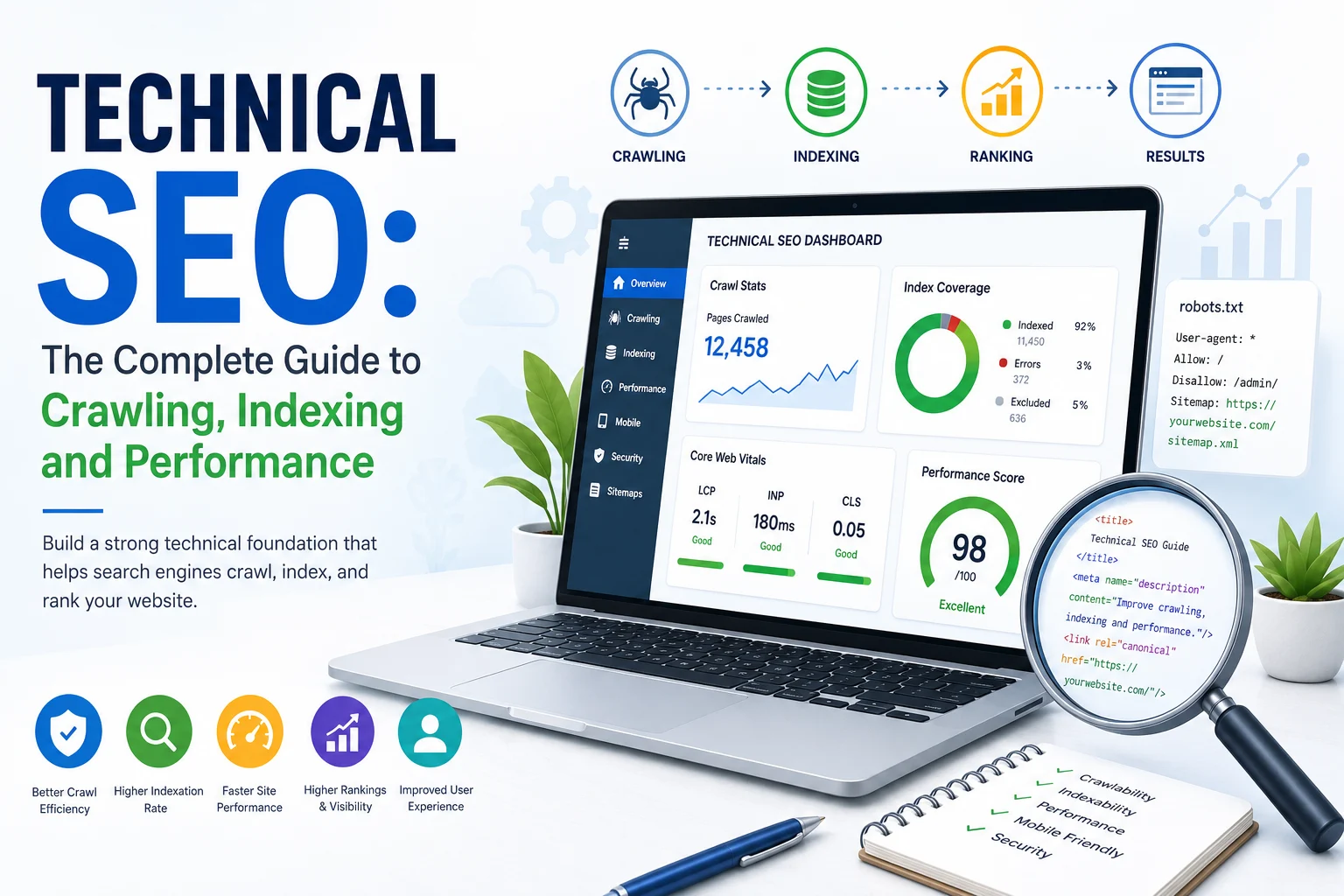
Technical SEO is the process of improving a website’s infrastructure so search engines can efficiently discover, crawl, render, understand, index, and serve its content. It also covers performance, mobile usability, security, structured data, site architecture, and the controls that determine which URLs should—or should not—appear in search results.
A technically healthy website does not automatically rank. It creates eligibility and removes barriers. Search engines still need relevant content, trustworthy signals, useful information, and a reason to choose the page over alternatives.
Google’s minimum technical requirements are simple: Googlebot must not be blocked, the page must return a successful 200 response, and it must contain indexable content. Meeting those requirements only makes a page eligible; crawling, indexing, and rankings are never guaranteed. Technical SEO therefore combines eligibility, efficiency, clarity, performance, and ongoing monitoring.
This pillar guide explains the full technical SEO system—from URL discovery and crawl controls to canonicalization, JavaScript rendering, Core Web Vitals, migrations, log analysis, auditing, and technical requirements for AI-powered search experiences.
New to the broader discipline? Start with What Is SEO? The Complete Search Engine Optimization Guide. For AI-generated answers and citations, see the Ultimate Guide to Answer Engine Optimization.
Table of Contents
ToggleTechnical SEO is the work of making a website technically accessible, understandable, efficient, and reliable for search engines and users. It focuses on the systems beneath the visible content: servers, URLs, HTML, rendering, crawl directives, status codes, canonicals, sitemaps, internal links, page performance, structured data, and monitoring.
A useful technical SEO program answers five questions:
Technical SEO is not limited to “fixing errors.” It also helps teams design scalable systems before problems appear. Examples include creating a URL strategy for an ecommerce catalog, defining rendering requirements for a JavaScript application, designing faceted navigation controls, automating sitemap generation, and protecting organic visibility during a migration.
A valuable page can remain invisible when its technical path is broken. Common examples include:
noindex directive remains after a staging-site launch.
Technical SEO does not create demand or relevance by itself. It ensures that strong content can participate in search without preventable infrastructure barriers.
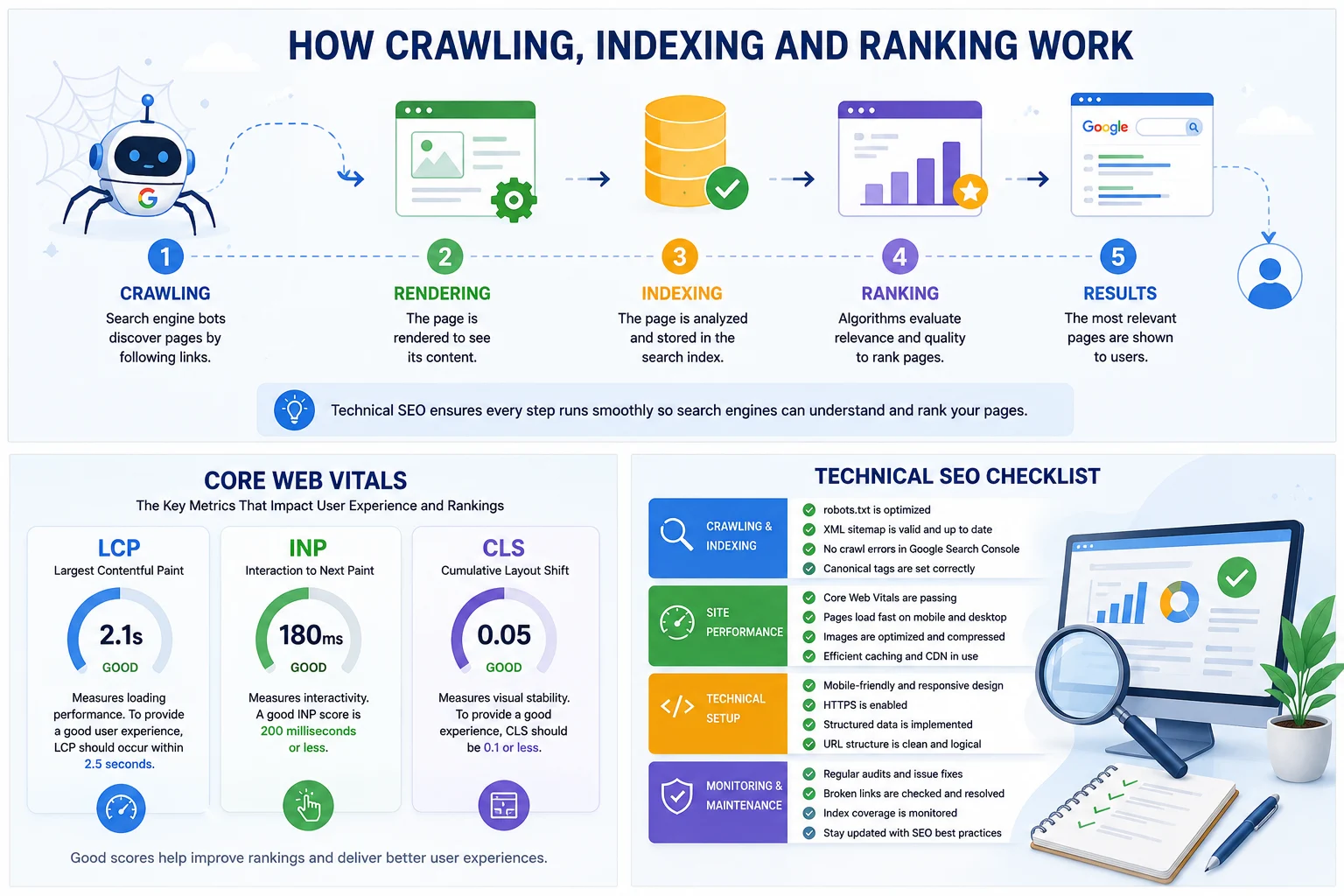
Search systems differ, but a practical model contains six connected stages.
Google explains that it renders pages and executes JavaScript using a recent version of Chrome. During indexing, it analyzes textual content, important tags and attributes, images, videos, duplicates, and canonical candidates. This is why technical SEO must account for both the original HTML and the rendered page.
A crawlable, indexable page may still be excluded from the index or may rank poorly. Search engines can decide that the page is duplicate, low-value, unavailable, inconsistent, or less useful than alternatives. Technical SEO should therefore be integrated with content quality, search intent, authority, and user experience.
| Discipline | Primary focus | Typical work | Main question |
|---|---|---|---|
| Technical SEO | Access, rendering, indexing, architecture and performance | Robots, sitemaps, canonicals, redirects, JavaScript, status codes, Core Web Vitals | Can search systems access and process the page correctly? |
| On-page SEO | Page relevance and presentation | Titles, headings, copy, images, metadata, internal links | Does the page clearly satisfy the search intent? |
| Content strategy | Topical coverage and information value | Research, topical maps, briefs, original evidence, updates | Is the information useful, complete and distinctive? |
| Off-page SEO | External authority and reputation | Digital PR, links, mentions, partnerships, citations | Do independent sources support the site’s credibility? |
| Local SEO | Visibility for location-based intent | Business profiles, local pages, reviews, NAP consistency, citations | Can nearby customers find and trust the business? |
These areas overlap. An internal link is simultaneously architectural, contextual, and navigational. Page speed involves development, user experience, conversion optimization, and search. The strongest programs assign shared ownership instead of treating technical SEO as an isolated monthly checklist.
Crawling begins when a search engine discovers a URL and decides to request it. Discovery commonly happens through internal links, external links, XML sitemaps, feeds, redirects, previously crawled URLs, and supported submission systems.
Important pages should be linked using standard HTML anchors with accessible destination URLs. Search engines and users should not need to perform a search, submit a form, hover over an element, or execute a complex interaction merely to discover core content.
<a href="https://example.com/services/technical-seo/">Technical SEO services</a>Avoid relying solely on JavaScript event handlers without an href, canvas-based navigation, or client-side state that never produces a stable URL.
A crawl trap creates a very large or effectively infinite URL space. Common causes include:
Control traps through architecture, parameter rules, canonicalization, robots controls where appropriate, noindex decisions, link restrictions, and server-side normalization. The correct solution depends on whether users need the URL, whether it has unique value, and whether crawlers need to access it.
Crawl budget is most important for very large, frequently updated, or technically inefficient websites. Small sites rarely need to “optimize crawl budget” as a standalone project. They usually benefit more from fixing broken links, improving architecture, submitting clean sitemaps, and removing accidental blocks.
Large-site crawl efficiency can be improved by:
robots.txt tells compliant crawlers which URL paths they may request. It is a crawl-control mechanism, not a reliable method for preventing a URL from appearing in search results.
User-agent: *
Disallow: /internal-search/
Disallow: /cart/

Sitemap: https://example.com/sitemap.xml| Control | What it does | When to use it | Important limitation |
|---|---|---|---|
robots.txt | Restricts crawling of matching paths for compliant crawlers | Reducing access to low-value crawl spaces or protected crawl paths | A blocked URL can still be known and may appear without a snippet |
noindex | Requests exclusion from the index | Pages that may be crawled but should not appear in search | The crawler must be able to access the page to see the directive |
| Authentication | Requires valid credentials | Private or confidential content | Users and crawlers without access cannot view the content |
| Removal tool | Temporarily hides qualifying URLs from results | Urgent temporary removal while permanent controls are implemented | It is not a long-term indexing strategy |
Do not block a URL in robots.txt and simultaneously expect a crawler to process a noindex tag on that page. If the crawler cannot fetch the page, it may not see the indexing directive.
This prevents a common problem: publishing informational content that attracts attention but provides no logical path toward a useful or commercial outcome.
Robots exclusions do not consolidate duplicate signals. Use redirects, rel="canonical", consistent internal links, and clean sitemap inclusion for canonicalization. Google describes redirects and canonical annotations as strong signals, while sitemap inclusion is a weaker canonical signal.
Supporting guide: Robots.txt for SEO: Complete Configuration Guide.
Search crawlers interpret the HTTP response before they evaluate the page content. Incorrect responses can create indexing problems even when the browser appears to show a usable page.
| Status | Meaning | Typical SEO use |
|---|---|---|
200 | Successful response | Normal indexable pages and resources |
301 or 308 | Permanent redirect | Permanent URL changes and canonical consolidation |
302 or 307 | Temporary redirect | Temporary routing when the original URL should remain primary |
404 | Resource not found | Removed or invalid URLs with no suitable replacement |
410 | Resource intentionally gone | Content deliberately and permanently removed |
429 | Too many requests | Rate limiting; sustained responses can restrict crawling |
500 | Internal server error | Application or server failure |
503 | Service unavailable | Temporary maintenance or overload, ideally with a sensible Retry-After header |
A soft 404 occurs when a URL returns 200 but behaves like an error, empty result, or removed page. Examples include product pages with no product information, internal search pages with no results, or templates that say “not found” while returning success. Return an accurate error status when the resource does not exist.
Availability monitoring, error logging, synthetic tests, real-user monitoring, and Search Console crawl reports should be combined. Search crawlers may encounter failures that internal uptime checks miss.
An XML sitemap lists preferred URLs that a search engine may crawl. It is especially useful for large sites, newly launched sites, pages with limited external links, frequently updated content, and image, video, or news discovery.
lastmod values when meaningful
Do not fill sitemaps with redirects, errors, duplicates, blocked URLs, noindex pages, parameter combinations, or noncanonical variants. A sitemap does not guarantee crawling or indexing and does not directly increase rankings.
Large websites should split sitemaps by logical type, directory, template, or update pattern and list them in a sitemap index. Segmentation improves diagnosis because teams can compare submitted and indexed patterns for products, categories, articles, locations, videos, or other groups.
IndexNow allows participating search engines to receive notifications when URLs are added, updated, or deleted. A successful response means the notification was received; it does not guarantee crawling, indexing, or ranking. Use it as a change-notification mechanism, not a substitute for crawlable architecture or sitemaps.
Supporting guides: XML Sitemaps: The Complete SEO Guide and IndexNow for SEO: How and When to Use It.
A crawlable URL is not automatically indexable, and an indexable URL is not automatically indexed. Indexing depends on technical eligibility, content availability, canonicalization, duplication, quality, policy compliance, and the search engine’s own decisions.
<meta name="robots" content="index,follow">
<meta name="robots" content="noindex,follow">
<meta name="googlebot" content="noindex">
Use the HTTP X-Robots-Tag header for PDFs, images, documents, or any response where an HTML meta tag is unavailable.
X-Robots-Tag: noindexNot every URL should be indexed. Pages that may deserve exclusion include internal search results, account pages, shopping carts, duplicate filter combinations, thin tag archives, staging URLs, expired campaigns without ongoing value, and private resources. The goal is not the highest number of indexed pages. It is a clean indexable set that represents the website’s valuable search inventory.
Supporting article: What Are Crawling and Indexing in SEO?.
Canonicalization is the process of identifying the preferred representative URL among duplicate or very similar pages. Duplicate URLs can arise from parameters, capitalization, protocol differences, hostnames, print versions, pagination, tracking codes, faceted navigation, product variants, or CMS behavior.
rel="canonical" annotations
Google treats redirects and canonical annotations as strong signals and sitemap inclusion as a weaker signal. Signals can be combined, but they should not conflict.
Use a redirect when users and crawlers should no longer access the old URL as a standalone page. Use a canonical when duplicate or near-duplicate URLs must remain accessible but one should be treated as preferred. A canonical is a signal, not a forced redirect.
Supporting guide: Canonical Tags: How They Work and When to Use Them.
JavaScript SEO ensures that important content, links, metadata, and controls remain accessible when a website depends on client-side code. Google processes JavaScript applications through crawling, rendering, and indexing, but rendering adds complexity and can expose failures that do not exist on static HTML pages.
| Approach | How it works | SEO considerations |
|---|---|---|
| Server-side rendering | The server returns complete or near-complete HTML for each request | Strong default for critical content and metadata; still test hydration and client transitions |
| Static generation | HTML is created during a build process | Fast and crawlable for content that does not need real-time generation |
| Client-side rendering | The browser builds most content after JavaScript runs | Can work, but depends more heavily on rendering, APIs, resources, and error handling |
| Hybrid rendering | Different routes or components use different rendering methods | Often practical, but requires template-level testing |
| Dynamic rendering | Different rendered output is served to crawlers | A workaround rather than a preferred long-term architecture; parity and maintenance are critical |
Google warns that it may skip rendering when it encounters noindex. If a page should be indexed, avoid placing noindex in the initial HTML and relying on JavaScript to remove it later.
Users and crawlers should receive equivalent primary information. Compare the original HTML, rendered DOM, screenshots, structured data, internal links, metadata, and API responses. Search Console’s URL Inspection tool and browser developer tools are useful, but automated template testing is essential for larger applications.
Supporting guide: JavaScript SEO: Crawling, Rendering and Indexing.
Site architecture determines how pages are grouped, linked, discovered, and interpreted. A good structure helps users navigate while helping search engines identify relationships and priority.
Home
├── Services
│   ├── Technical SEO
│   ├── Content Strategy
│   └── Local SEO
├── Resources
│   ├── Guides
│   ├── Templates
│   └── Research
└── About
The hierarchy should reflect user tasks and topical relationships rather than forcing every page into an arbitrary three-click rule.
Navigation links show broad structure. Contextual links explain relationships inside the content. Use descriptive anchors, link to canonical URLs, fix broken destinations, and avoid creating thousands of repeated low-value links in templates.
An orphan page has no crawlable internal links from the main website. It may still be known through a sitemap or external link, but it lacks architectural context. Find orphans by comparing crawled URLs, sitemap URLs, analytics landing pages, Search Console exports, CMS inventories, and server logs.
Breadcrumbs provide a secondary navigation path and clarify hierarchy. Keep visible breadcrumb links aligned with the page’s actual placement and structured data.
Supporting articles: Website Architecture for SEO and How to Find and Fix Orphan Pages.
Good URLs are stable, descriptive, and understandable. They help users, analysts, developers, and crawlers identify the resource without depending on hidden application state.
Changing a URL requires crawling, redirect processing, canonical updates, internal-link updates, sitemap updates, analytics adjustments, and time for signals to consolidate. A cosmetically imperfect but stable URL may be better than an unnecessary migration.
Supporting guide: How to Create SEO-Friendly URLs.
Faceted navigation allows users to filter products, listings, jobs, properties, articles, or other large datasets. It can also create enormous numbers of crawlable URL combinations.
A filtered page may deserve indexing when it has distinct demand, a stable inventory, unique value, meaningful content, and a sustainable internal-link path. Most arbitrary combinations do not need to appear in search.
noindex when crawling is needed but indexing is not.Paginated pages should use crawlable links and stable URLs. Each page can be self-canonical when it contains a distinct portion of a list. Do not automatically canonicalize every page to page one when the later pages contain unique items users and crawlers need to discover.
A technically optimized website must work for real users across devices, input methods, network conditions, and assistive technologies.
Accessibility is not a single ranking switch, but accessible implementation improves semantic structure, link usability, image understanding, keyboard navigation, form completion, and overall product quality. Use native HTML elements before recreating controls with generic containers and JavaScript.
Do not reduce user experience to a Lighthouse score or a single Core Web Vitals report. Evaluate security, mobile behavior, intrusive elements, responsiveness, reliability, visual stability, accessibility, and task completion together.
Core Web Vitals are field metrics representing loading, interactivity, and visual stability. The current stable metrics and “good” thresholds are:
| Metric | What it measures | Good threshold |
|---|---|---|
| Largest Contentful Paint (LCP) | Loading performance of the largest visible content element | 2.5 seconds or less |
| Interaction to Next Paint (INP) | Responsiveness across user interactions | 200 milliseconds or less |
| Cumulative Layout Shift (CLS) | Unexpected visual movement | 0.1 or less |
The recommended evaluation uses the 75th percentile of page loads, segmented by mobile and desktop. Field data reflects real users; lab data is useful for diagnosis and regression testing but cannot fully replace field measurement. Lighthouse cannot directly measure INP without real interactions and uses Total Blocking Time as a lab proxy.
Supporting guide: Core Web Vitals: The Complete SEO and Performance Guide.
Structured data uses a recognized vocabulary to describe entities and properties in a machine-readable format. It can help search systems interpret content and may make pages eligible for supported search features. Eligibility does not guarantee display.
<script type="application/ld+json">
{
  "@context": "https://schema.org",
  "@type": "Article",
  "headline": "Technical SEO: The Complete Guide",
  "author": {
    "@type": "Person",
    "name": "Example Author"
  },
  "mainEntityOfPage": "https://example.com/technical-seo-guide/"
}
</script>
Structured data does not replace visible content, accessible HTML, internal links, or technical eligibility.
International websites need clear URLs, language signals, canonicals, hreflang annotations, and region-specific governance.
x-default for a generic selector or default page when appropriate.| Structure | Example | Considerations |
|---|---|---|
| Country-code domain | example.fr | Strong geographic clarity but separate authority, infrastructure, and governance |
| Subdomain | fr.example.com | Flexible separation, but may require more technical and organizational overhead |
| Subdirectory | example.com/fr/ | Consolidated domain management and often easier authority sharing |
| Parameter | example.com?lang=fr | Usually less clear and more difficult to manage consistently |
A website migration can change domains, protocols, CMS platforms, URL structures, templates, hosting, rendering systems, or several of these at once. Every additional change increases diagnostic complexity.
Supporting guide: How to Redesign or Migrate a Website Without Losing SEO.
Technical SEO depends on a secure and reachable website. HTTPS protects data in transit and is a basic expectation for modern websites. Security incidents can cause downtime, injected spam, malicious redirects, reputation damage, browser warnings, and index contamination.
A web application firewall or CDN can unintentionally block legitimate search crawlers, rendering resources, or geographic regions. Validate crawler identities using official methods where available, monitor denied requests, and avoid broad user-agent rules that attackers can spoof.
Search crawling, user-initiated retrieval, product functionality, and model-training controls may use different user agents and policies. Maintain a documented crawler matrix and follow each provider’s current official guidance. Do not assume one robots rule controls every purpose.
Server logs show what requested the website, when it requested it, which URL it requested, and how the server responded. This provides evidence that browser crawlers and client-side audit tools cannot fully reproduce.
No single tool provides a complete technical SEO view. Combine crawler, search-engine, browser, analytics, log, monitoring, and source-code evidence.
| Tool category | What it helps evaluate |
|---|---|
| Search engine tools | Indexing, crawl statistics, URL inspection, sitemaps, enhancements, search performance |
| Site crawlers | Links, status codes, canonicals, metadata, directives, depth, duplicates, structured data |
| Browser developer tools | Rendered DOM, network requests, JavaScript errors, performance traces, accessibility |
| Performance tools | Field data, lab diagnostics, waterfalls, Core Web Vitals and regressions |
| Log-analysis tools | Actual crawler requests, response patterns, wasted crawling and server errors |
| Analytics platforms | Landing pages, engagement, conversions and business impact |
| Monitoring systems | Availability, certificates, DNS, status codes, performance budgets and deployment regressions |
| Validation tools | Structured data, HTML, feeds, sitemaps, hreflang and security configuration |
Third-party tools are valuable, but their labels are not search-engine verdicts. Validate important findings against the live system and official reports.
A technical SEO audit should move from business inventory to technical evidence, prioritization, implementation, and verification. A list of thousands of warnings without context is not a strategy.
Combine URLs from crawls, XML sitemaps, Search Console, analytics, backlinks, CMS exports, databases, feeds, and logs. Differences among these sources often reveal orphan pages, obsolete URLs, or incomplete crawls.
Every issue should include evidence, affected templates, business impact, recommended fix, owner, dependencies, validation method, and estimated effort.
Recrawl the affected templates, inspect live responses, compare rendered output, test logs, monitor search-engine reports, and confirm that business metrics did not regress.
Supporting guide: How to Perform a Technical SEO Audit.
Prioritize by expected impact, confidence, reach, urgency, and implementation cost—not by how alarming a tool label sounds.
| Priority factor | Questions to ask |
|---|---|
| Business impact | Does the issue affect revenue, leads, critical content, or a strategic market? |
| Reach | Does it affect one URL, one template, or the entire platform? |
| Severity | Does it block crawling or indexing, degrade performance, or merely create a minor inconsistency? |
| Confidence | Is the diagnosis supported by live responses, logs, official reports, and reproducible tests? |
| Urgency | Is there an active outage, migration, security incident, or upcoming release? |
| Effort and dependencies | Can it be fixed safely, and which teams or systems are involved? |
| Reversibility | Can the change be rolled back if the result is negative? |
| Measurement | How will the team confirm technical and business improvement? |
noindexAI-powered search experiences still depend on discoverable, accessible, understandable, and useful web content. Technical SEO creates eligibility for retrieval, but no technical tactic guarantees selection or citation.
Google’s guidance for AI features continues to rely on the existing Search index, ranking systems, technical eligibility, and established SEO practices. Avoid replacing foundational work with speculative files, mass-generated pages, or unsupported “AI schema” claims.
Maintain separate decisions for search crawling, user-initiated retrieval, product functionality, and model training. Review official provider documentation and coordinate technical controls with legal, security, and content teams.
For the broader framework, see the complete guide to answer engine optimization.
Robots blocking can prevent the crawler from seeing the noindex directive. Choose controls according to the intended outcome.
Sitemaps should represent preferred indexable URLs, not a complete export of every parameter, redirect, error, duplicate, and utility page.
A canonical is for duplicate or very similar content. It is not a general mechanism for removing low-quality pages from the index.
Tools report patterns and heuristics. Confirm business impact and live behavior before creating development work.
URL migrations create risk and processing time. Preserve stable URLs unless the change solves a meaningful structural or business problem.
Measure real users, multiple templates, mobile and desktop, and important interactions. One laboratory score cannot represent the entire website.
A browser may display content after scripts run while the source HTML, crawler rendering, or APIs fail. Test the complete processing path.
Without prelaunch URL, traffic, ranking, index, conversion, and crawl baselines, teams cannot distinguish migration impact from normal variation.
Redirect only when a relevant replacement exists. Irrelevant mass redirects create poor user experiences and ambiguous signals.
Small websites should usually focus on clean links, correct directives, content quality, and performance before advanced crawl-budget analysis.
Use a structured audit to identify which technical issues affect eligibility, valuable templates, user experience, and business performance.
Technical SEO is the work of making a website easy for search engines to discover, crawl, render, understand, and index while keeping it fast, secure, and usable for people.
Yes, but the required depth varies. A small brochure site needs correct crawling, indexability, status codes, canonicals, mobile behavior, security, and performance. A large ecommerce or JavaScript platform needs more advanced architecture, rendering, faceted-navigation, log, and crawl management.
Technical SEO can remove barriers and consolidate signals, but it does not guarantee rankings. Search systems still evaluate relevance, usefulness, quality, authority, context, and competition.
Crawling is the process of requesting and discovering pages and resources. Indexing is the process of analyzing eligible content and storing information that may later be retrieved for search results.
Yes. A page may be crawled and excluded because of a noindex directive, duplication, canonical selection, soft-404 classification, low value, policy issues, or other indexing decisions.
A URL blocked by robots.txt can still be known through links or other signals and may appear without a normal snippet. Use noindex with crawl access, authentication, or another appropriate control when the goal is exclusion.
No. A sitemap helps search engines discover preferred URLs but does not guarantee crawling, indexing, or higher rankings.
For most indexable pages, a self-referencing canonical is a useful consistency signal. Duplicate variants should point to the preferred URL. The complete signal set should not conflict.
Google can render and index JavaScript-powered pages, but JavaScript introduces additional dependencies and failure points. Important content, links, metadata, status handling, and canonical signals should be tested in the rendered output.
The current stable Core Web Vitals are Largest Contentful Paint, Interaction to Next Paint, and Cumulative Layout Shift. Good thresholds are LCP at 2.5 seconds or less, INP at 200 milliseconds or less, and CLS at 0.1 or less, evaluated at the 75th percentile.
Critical websites should use continuous monitoring and deployment checks. A broader audit may be useful quarterly, before and after major releases, and whenever the site changes domains, platforms, rendering, URL structures, or infrastructure.
A 301 redirect sends users and crawlers to another URL and indicates a permanent move. A canonical tag leaves the current page accessible while signaling that another URL is the preferred representative.
No. Page speed is a broad concept covering network, server, rendering, assets, and interaction performance. Core Web Vitals are three field metrics representing loading, responsiveness, and visual stability.
No. Correct structured data can create eligibility for supported features, but search engines decide whether and how to display them.
Server and user-experience improvements may be immediate. Search effects depend on recrawling, rendering, reprocessing, canonical consolidation, indexing, and query demand. Sitewide or migration-related changes can take longer than isolated fixes.
Yes, by improving discovery, access, rendering, clarity, performance, and source reliability. It creates eligibility, but it cannot guarantee selection, citation, or representation in an AI-generated answer.
Technical SEO is best understood as an operating system for organic visibility. It connects infrastructure, development, content, analytics, security, performance, and search governance.
A sustainable program follows this sequence:
The goal is not a website with zero tool warnings. The goal is a technically reliable platform where search systems can process the right pages and users can complete meaningful tasks.
Connect technical eligibility with search intent, content quality, internal linking, authority, AI-search visibility, and conversion measurement.
Receive a prioritized action plan—not a guarantee of rankings or citations.